> For the complete documentation index, see [llms.txt](https://docs.insilicoterminal.com/documentation/llms.txt). Markdown versions of documentation pages are available by appending `.md` to page URLs; this page is available as [Markdown](https://docs.insilicoterminal.com/documentation/execution-panel/place-order-overview.md).
# Place Order Overview
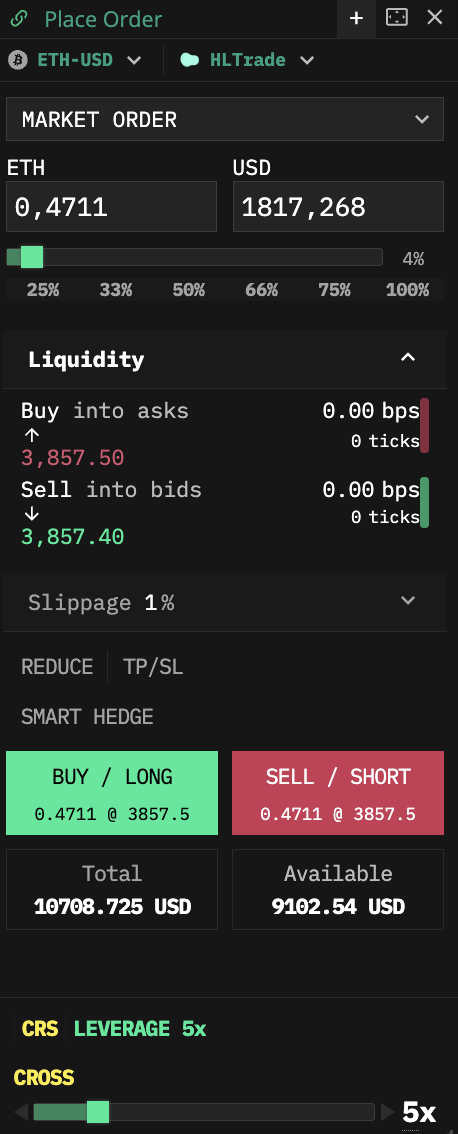
This replaces the old Orderform component on the left, for Instrument Statistics, use the new Market component.
There are two selectable tabs by order type: Limit and Market and a drop-down sub menu under each to select a specific operation. They are;
Limit: [Limit order](/documentation/limit-tab/limit.md), [Stop](/documentation/limit-tab/stop-limit.md), [Click placement](/documentation/limit-tab/click-placement.md), [Chase](/documentation/limit-tab/chase.md), [Scale](/documentation/limit-tab/scale.md), [Scale Side](/documentation/limit-tab/scale-side.md)\
Market: [Market order](/documentation/market/market.md), [Stop](/documentation/market/stop-market-order.md), [Swarm](/documentation/market/swarm.md), [TWAP](/documentation/market/twap.md)
{% embed url="" %}
For convenience, included underneath every view in this panel and for the current instrument are; Total and Available Balance and [**Margin Control/Leverage**](/documentation/execution-panel/margin-leverage-control.md)**.**