> For the complete documentation index, see [llms.txt](https://docs.insilicoterminal.com/documentation/llms.txt). Markdown versions of documentation pages are available by appending `.md` to page URLs; this page is available as [Markdown](https://docs.insilicoterminal.com/documentation/limit-tab/chase.md).
# Chase
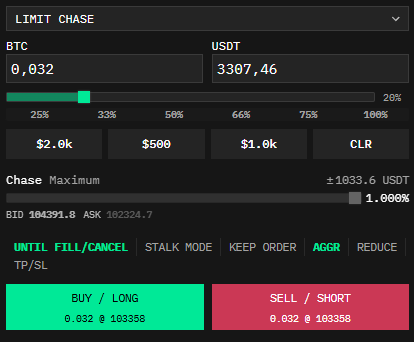
Places a limit order at the best bid or ask and continually adjust its price to follow the quote until the order is cancelled, filled, or a maximum chase ‘distance’ is reached.
You can run multiple simultaneous chase orders and monitor them in the [Orders](/documentation/application-elements/orders.md) component.
**Chase To** sets the maximum acceptable adverse price for your order. For example, if choosing 0.5% with an initial entry of 10,000 the chase function continually adjusts the order price up to 10,000 + 0.5% = 10,050 (in case of a buy order). For convenience the red and green boxes below preview the maximum possible adverse price for each side.
**Switches:**
* **Until Fill/Cancel** - Infinite chase. “Chase To” price is disabled and the order will continue to adjust until the operation is cancelled by the user or the order is filled
* **AGGR** - Toggle AGGR to make it chase the opposite side quote +/- 1 tick - instead of the top/bottom of your own side of the book.
* **Keep Order -** If canceled chase price it stays as a limit order
* **Reduce** - Can only reduce your open position
* **TP/SL** - Use [TP or SL](/documentation/execution-panel/tp-sl-switch.md) for your chase
### **Stalk Mode**
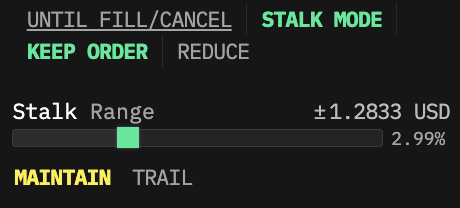
This mode performs a Chase, but instead of placing your order at the best bid or ask, it places the order at a given number of ticks/% away from the best bid/ask:
Here we're chasing or "stalking" the bid using the settings specified above. You can see the bid is kept 0.50% (roughly 493 USD) from the actual best bid price in the order book.
When the market quote moves up the limit order will follow it, at the given distance.
There are two Stalk options:
**Maintain** attempts to maintain the given distance no matter if the market quote moves up or down. Your order would get filled on a wick when someone with one market order cuts through all resting bids/asks in the "maintained" distance between your order and the actual price.
**Trail** is one-way and only moves your order towards the market quote. You can think of this as similar to a trailing stop. e.g. So, if you're stalking the bid and the market quote moves up, then your bid moves up -- however if the market quote moves down then your bid price is left unchanged.
{% hint style="warning" %}
Caution: when using the **Maintain** option it is still possible your order will be filled during volatile market behavior. This possibility is more likely with a tight stalk distance.
{% endhint %}